200 Procreate Comic Storyboard Builder: A Practical Toolkit for Digital Comic Creators
Streamlining Comic Creation with a Specialized Procreate Resource
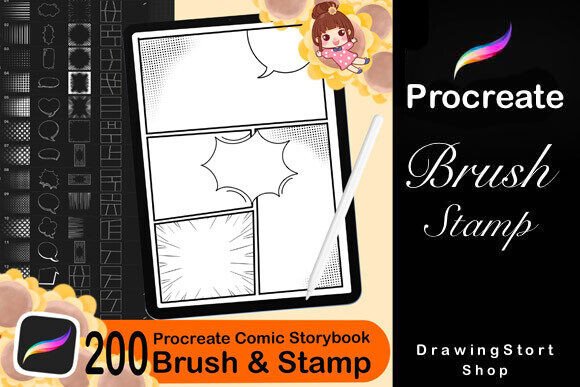
The 200 Procreate Comic Storyboard Builder is a comprehensive digital toolkit designed to simplify and enhance the comic creation process for artists using the Procreate app on iPad. Whether you're a professional illustrator, indie creator, or hobbyist, this resource offers a well-structured set of tools that can significantly reduce prep time and elevate the visual quality of your work.
What sets this package apart is its thoughtful combination of stamps, brushes, and templates tailored specifically for comic production. With 120 comic speech bubbles, 40 Blocks for Comic Book Constructor, 30 Halftone Brushes, and 10 Speed Lines Backgrounds, it provides a versatile foundation for both storyboarding and final illustration.
Key Features and Their Practical Applications
Each component of the 200 Procreate Comic Storyboard Builder serves a distinct purpose in the comic creation pipeline. Let's explore how these elements contribute to a more efficient and polished workflow.
- Comic Speech Bubbles (120 total): These stamps offer a variety of shapes and sizes, enabling creators to quickly add dialogue and narration without having to draw each bubble manually. This saves time and ensures consistency in design across panels.
- Comic Book Constructor Blocks (40 total): These are ideal for laying out panels and frames during the storyboarding phase. They help establish composition early, allowing for more fluid storytelling and better pacing decisions.
- Halftone Brushes (30 total): These brushes simulate traditional halftone effects, giving digital work a printed comic book texture. They’re especially useful for shading, adding depth, and creating a retro or pop-art aesthetic.
- Speed Lines Backgrounds (10 total): These dynamic visual elements help convey motion and energy, essential for action scenes or dramatic transitions in a comic panel.
Usability and Integration into Procreate Workflow
One of the standout qualities of this toolkit is its seamless integration with the Procreate app. The included PDF guide makes importing brushes and stamps straightforward, even for users who are relatively new to Procreate. Once installed, these assets function like native tools, allowing for easy resizing, color adjustments, and blending with original artwork.
The stamps and brushes maintain high resolution and clarity at various sizes, which is crucial when scaling panels or effects for different output formats—whether for print, web, or mobile viewing. This flexibility supports a wide range of artistic styles, from minimalist webcomics to detailed graphic novels.
Real-World Use and Creative Flexibility
In practice, the 200 Procreate Comic Storyboard Builder shines during the early stages of comic development. For instance, a freelance illustrator working on a client's short comic can use the panel blocks and speech bubbles to rapidly prototype layouts and test pacing before committing to detailed inks.
The Halftone Brushes also offer more than just visual flair. They can be layered to create depth, simulate lighting effects, or enhance the mood of a scene without the need for complex layering or texture overlays. This streamlines the coloring and shading process, particularly for artists working under tight deadlines.
For creators focused on pop art or retro aesthetics, the Pop Art Bubble Stamp Brushes provide a quick way to add stylized dialogue and sound effects that match the bold, graphic nature of that genre.
Who Benefits Most from This Toolkit?
This resource is particularly valuable for:
- Comic book creators looking to speed up the layout and design phase of their projects.
- Digital illustrators who want to add comic-style elements to their artwork without redrawing common components.
- Educators and content creators designing visual narratives or educational comics for digital platforms.
- Freelancers and small studios producing content under time constraints while maintaining visual consistency.
Even creators outside the comic industry can find utility in this toolkit. Bloggers, marketers, and social media designers can use the stamps and brushes to create engaging visual content with a comic or pop-art flair.
Commercial Use and Licensing Considerations
The licensing terms are clear and practical: users are permitted to incorporate the stamps and brushes into their final artwork for both personal and commercial use. This includes selling prints, stickers, digital products, and sharing content on social media. However, redistribution of the brushes or stamps as standalone files is not allowed, nor is claiming ownership of the assets.
This licensing model ensures that creators can confidently use the toolkit in client work and product creation without legal ambiguity, while protecting the original creator's intellectual property.
Limitations and Considerations
While the 200 Procreate Comic Storyboard Builder is a powerful toolkit, it’s not a one-size-fits-all solution. It works best for creators who already have a basic understanding of Procreate and comic design principles. Beginners may find the volume of assets overwhelming at first, though the included guide helps mitigate that learning curve.
Also, while the toolkit provides a solid foundation, it may not replace the need for custom-drawn elements in highly stylized or unique projects. Think of it as a productivity booster rather than a complete replacement for original design work.
Final Thoughts: Is This Toolkit Right for You?
If you're regularly producing comic-style artwork, storyboards, or related digital content, the 200 Procreate Comic Storyboard Builder is a worthwhile investment. It delivers a well-rounded set of tools that enhance both efficiency and visual quality, especially for those working within the Procreate ecosystem.
Its real-world utility, ease of integration, and flexible licensing make it a smart addition to any digital artist's toolkit—particularly for professionals who need to maintain consistency and speed in their workflow. While it won’t replace your creative input, it will help you focus more on storytelling and artistry rather than repetitive layout tasks.