Fire SVG Bundle, Fire ClipArt, and Flame SVG: Igniting Creative Projects Across Mediums
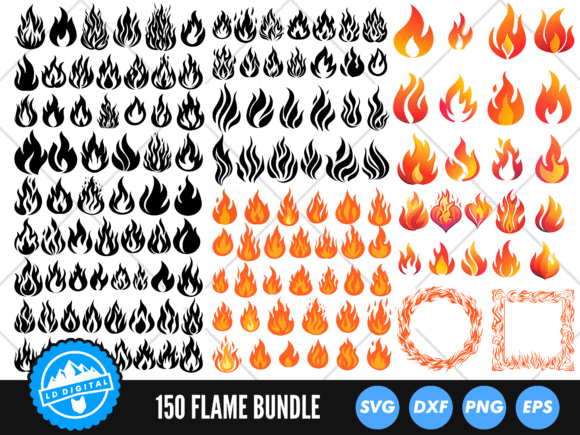
When a design project calls for intensity, warmth, or dynamic movement, few visual elements deliver quite like fire. The 🔥 Flame SVG Mega Bundle offers a comprehensive library of 150 fire-themed designs specifically curated for makers, digital artists, and small business owners. Rather than spending hours drawing individual flames or searching for disjointed assets, this collection provides a cohesive ecosystem of Fire SVG Bundle files, Fire ClipArt, and versatile Flame SVG cuts. Whether you are operating a Cricut or Silhouette machine, designing apparel in Adobe Illustrator, or creating digital content, having immediate access to layered flames, silhouettes, and artistic abstracts streamlines the creative workflow significantly.
Transforming Apparel and Merchandise with Layered Flames
For those in the custom apparel industry, particularly creators selling on platforms like Etsy or at local craft fairs, the 32 layered flame designs included in this bundle serve as a cornerstone for high-value products. Layered SVGs are distinct from standard single-color cuts because they allow for dimensional color blocking using heat transfer vinyl (HTV) or adhesive vinyl. A single-color flame silhouette might work for a basic sticker, but a multi-layered flame creates depth and professional polish on t-shirts, hoodies, and tote bags.
Consider the practical application for seasonal merchandise. During autumn and winter, warm-toned layered flames pair exceptionally well with cozy knitwear aesthetics or camping gear branding. Conversely, bright orange and yellow layers can evoke summer bonfires or festival vibes. Because these files come pre-layered, you avoid the tedious process of manually separating colors in design software. You simply load the file, assign your vinyl colors, and cut. This efficiency is crucial when fulfilling bulk orders or testing new product lines where turnaround time directly impacts profitability.
Digital Design and Print Media Applications
Not every project involves a cutting machine. The inclusion of 32 high-quality Fire ClipArt PNGs with transparent backgrounds addresses the needs of graphic designers and digital content creators. These raster images are optimized at 300 DPI, ensuring they remain crisp when printed on physical media or displayed on high-resolution screens. Digital planners, social media templates, and website headers often require organic textures to break up rigid grid layouts, and fire clip art provides that chaotic yet controlled energy.
For print-on-demand sellers, these PNGs are invaluable for creating complex compositions without needing advanced vector drawing skills. You can drag and drop a flame element behind typography to create a glowing text effect or use it as a corner accent on event flyers. The transparency ensures seamless integration over any background color or texture. Unlike low-resolution web images, these assets maintain integrity when scaled for posters or banners, preventing the pixelation that often ruins professional print jobs.
Framing and Border Solutions for Signage
One of the most specific yet versatile categories in this collection is the set of four flame frame designs. Frames solve a common design problem: how to contain information while maintaining an aggressive or energetic theme. Standard rectangular borders can feel sterile, but a flame frame adds context immediately. These are particularly useful for warning signs, hot sauce labels, gaming team logos, or automotive decals.
The availability of these frames in AI, DXF, EPS, JPG, SVG, and PNG formats means they adapt to whatever tool you are currently using. A sign maker using vinyl can cut the SVG version for a storefront window decal, while a packaging designer can import the AI or EPS file into Illustrator to wrap a label around a bottle. The ability to edit vector points in the AI/EPS files allows for customization; you can stretch a frame to fit non-standard dimensions or adjust the intensity of the flame tips to match a specific brand identity. This flexibility transforms a static asset into a adaptable design system.
Minimalist and Single-Cut Efficiency with Silhouettes
While layered designs offer complexity, the 78 flame silhouette designs cater to speed and minimalism. In production environments where weeding time is the primary bottleneck, single-color silhouettes are essential. These crisp, clean vectors are ideal for stencils, car decals, laptop stickers, and etched glass projects. Because they lack internal cut lines, they weed in seconds, making them perfect for high-volume runs or beginner crafters still mastering their technique.
Silhouettes also excel in mixed-media projects where the flame serves as a secondary element rather than the focal point. For example, if you are creating a wooden plaque with painted lettering, a simple flame silhouette burned into the wood or applied as a matte black decal provides thematic reinforcement without competing with the text. The sheer volume of 78 variations ensures you can find the exact shape needed—whether it’s a subtle flicker, a roaring blaze, or a stylized tribal flame—without compromising on cut quality.
Navigating File Formats for Different Machines
Understanding which file format to use is just as important as the design itself. This bundle removes compatibility guesswork by providing multiple formats for every vector design. If you are using a Cricut Maker or Explore, the SVG files are your primary resource; they retain layer information and scale infinitely without quality loss. For users with the basic edition of Silhouette Studio, which does not support SVG imports, the DXF files are the necessary alternative. DXF files preserve the cut lines but may sometimes require regrouping upon import.
For professional designers working in Adobe Illustrator or CorelDRAW, the AI and EPS files offer full editability. This is critical for clients who need proprietary modifications or for creating derivative works. Meanwhile, the PNG files serve as universal placeholders for mockups or non-vector workflows. Having all these formats in one bundle eliminates the frustration of purchasing a design only to discover it isn't compatible with your current software setup. It future-proofs your purchase, ensuring the assets remain usable even if you switch machines or software platforms later.
Practical Considerations Before Cutting and Creating
While the 🔥 Flame SVG Mega Bundle provides extensive resources, successful execution requires mindful preparation. Fire designs often feature intricate points and sharp angles. When cutting vinyl, especially glitter or holographic varieties, these fine details can lift during weeding. It is often practical to simplify nodes or slightly round off extremely sharp tips within your cutting software before sending the job to the machine. Testing on scrap material is always recommended when trying a new flame style, as the complexity varies significantly between the abstract designs and the silhouettes.
Color selection also plays a pivotal role in how these designs translate from screen to reality. A flame that looks vibrant in RGB digital format may appear muddy when replicated in vinyl layers. Consider the contrast between layers; if the colors are too similar, the dimensional effect is lost. Additionally, when using the abstract flame designs for apparel, pay attention to garment color. Dark fabrics generally make fire designs pop, whereas light fabrics may require a dark outline or shadow layer to define the flame's edge. Understanding these material interactions ensures the digital asset translates effectively into a tangible, high-quality product.
Expanding Creative Horizons Beyond Traditional Crafts
The utility of this collection extends beyond typical DIY crafts. Event planners can utilize the flame frames and clip art for immersive themed parties, music festivals, or corporate retreats focused on energy and transformation. Tattoo artists can use the vector silhouettes as flash sheet references or stencil bases, appreciating the clean lines that translate well to skin. Educators and STEM instructors might use the layered flames to teach concepts of combustion, energy transfer, or color theory in a visually engaging way.
Ultimately, the value of the Fire SVG Bundle lies in its versatility. It bridges the gap between hobbyist crafting and professional design, offering assets that scale with your ambition. By providing a wide array of styles—from artistic abstracts to functional frames—and supporting them with comprehensive file formats, this collection empowers creators to focus less on asset generation and more on innovative application. Whether lighting up a digital interface or adding warmth to a handmade gift, these fire designs provide the spark needed to elevate creative output across virtually any medium.