Old Newspapers Digital Paper: Integrating Vintage Textures into Modern Creative Workflows
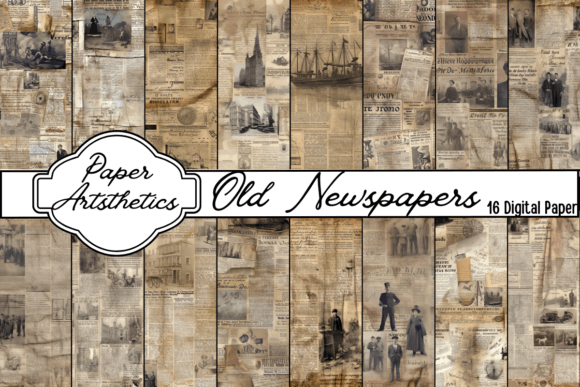
Welcome to Paper Art-sthetics, where the intersection of historical charm and digital utility defines our approach to creative assets. For professionals, educators, and hobbyists seeking to add authentic texture to their projects, understanding the practical application of Old Newspapers Digital Paper is essential. This resource is not merely a collection of images; it is a functional design element that bridges the gap between analog nostalgia and modern digital production. Specifically, this unique Vintage Newspaper Digital Paper Pack offers 16 coffee brown newspaper designs tailored for high-resolution output, ensuring that whether you are embellishing a planner, constructing a junk journal, or designing personalized stationery, the final result maintains professional integrity.
Defining the Asset in a Production Context
Old Newspapers Digital Paper serves as a foundational layer in mixed-media and digital design workflows. Unlike standard solid colors or generic patterns, these textures carry semantic weight. They imply history, storytelling, and authenticity without requiring the creator to source physical ephemera. In a broader process, this asset functions as both a background and a compositional tool. The specific pack from Paper Art-sthetics provides files at 3600 x 3600 pixels with 300 DPI resolution. This specification is critical for workflow efficiency because it allows for seamless scaling. A designer can use the full 12x12 inch canvas for scrapbooking layouts or crop significantly into the text and grain details for smaller applications like business cards or social media graphics without experiencing pixelation or loss of clarity.
The inclusion of both PNG and JPG formats addresses different stages of the creative pipeline. JPGs are optimized for speed and compatibility during the drafting and layout phases, keeping file sizes manageable when working with multiple layers. PNGs, retaining higher fidelity and potential transparency support depending on the edit, serve as the master files for final rendering and archival storage. Understanding this distinction helps creators manage system resources effectively while maintaining quality control throughout the project lifecycle.
Pre-Project Preparation and Asset Management
Successful integration of vintage textures begins before the design software is even opened. Organization is key for productivity-minded users who manage extensive digital libraries. Upon downloading the 16-file pack, immediate categorization prevents future friction. We recommend creating a dedicated folder structure based on tone or utility rather than just date acquired. For example, tagging these specific coffee brown papers under "Warm Tones," "Vintage Text," or "Junk Journal Backgrounds" streamlines retrieval during active work sessions.
Compatibility checks are another vital preparatory step. While 300 DPI is the print industry standard, verifying color profiles ensures consistency across mediums. These digital papers feature a distinct coffee brown palette. Before incorporating them into a project intended for commercial printing, convert or verify the CMYK values if your workflow demands it, as screen RGB displays often render browns more vibrantly than ink on paper. For digital-only outputs like blog headers or e-planners, RGB remains sufficient. Performing this audit early prevents costly reprints or time-consuming color corrections later in the execution phase.
Implementation Across Creative Disciplines
The versatility of Old Newspapers Digital Paper becomes apparent when applied to specific workflows. Each discipline requires a slightly different approach to maximize the asset's utility.
Junk Journaling and Scrapbooking
In the realm of junk journaling, these digital papers act as digital ephemera. Rather than hunting for physical newspapers that match a specific aesthetic, creators can print these high-resolution files onto matte paper or vellum. The 12x12 inch dimensions align perfectly with standard scrapbook album sizes, eliminating the need for tiling or stretching. During the assembly process, these backgrounds provide a neutral yet visually complex base that supports photographs and handwritten notes without competing for attention. The coffee brown tone specifically complements sepia photography, kraft paper, and leather bindings, creating a cohesive visual narrative.
Planner Embellishment and Stationery Design
For entrepreneurs and freelancers designing personalized stationery or planner inserts, consistency is paramount. Using a unified set of 16 coordinated papers ensures that an entire product line feels curated rather than disjointed. When designing functional items like weekly spreads or note-taking templates, opacity adjustments are crucial. Lowering the opacity of the newspaper texture to 30-50% creates a subtle watermark effect that adds depth without compromising text readability. This balance between aesthetics and function is what separates professional-grade stationery from amateur crafts.
Digital Content and Marketing Assets
Marketers and bloggers can leverage these textures to establish brand atmosphere. In web design or social media content creation, Old Newspapers Digital Paper provides an organic counterpoint to clean, modern typography. Cropping into the high-resolution 3600px files allows for the extraction of specific headlines, advertisements, or column layouts that can serve as standalone graphic elements. This modular approach extends the value of the pack beyond simple backgrounds, turning it into a library of reusable design components for campaigns requiring a vintage or artisanal feel.
Technical Integration and Workflow Efficiency
Integrating these assets smoothly requires adherence to best practices regarding file handling and layer management. Because the files are high resolution, working non-destructively is advised. Use smart objects in Photoshop or equivalent linked file features in other software. This preserves the original 300 DPI quality regardless of how many times you resize or transform the layer during the iterative design process.
Blending modes are the primary mechanism for making digital paper interact naturally with other elements. Standard "Normal" blend mode often results in a flat, pasted-on look. Experimenting with Multiply, Overlay, or Soft Light allows the paper texture to merge with underlying colors and shadows. For the coffee brown variety in this pack, Multiply tends to deepen the warmth and integrate well with darker themes, while Screen or Lighten can lift the texture for use on black or navy backgrounds. Mastering these interactions reduces the need for manual masking and erasing, significantly speeding up production time.
Batch processing is another efficiency lever. If you intend to use these papers for a series of products, such as a set of 10 greeting cards, create a master template with pre-set adjustment layers and blending modes. Dropping each of the 16 variations into this template allows for rapid prototyping and visualization. This method transforms individual asset selection into a systematic production workflow, enabling creators to evaluate the entire collection’s potential in minutes rather than hours.
Quality Control and Long-Term Usability
Maintaining the integrity of Old Newspapers Digital Paper over time involves proper digital hygiene. Always retain the original ZIP or master folder. Working copies should be saved separately to prevent accidental overwrites or corruption of the source files. For professionals delivering client work, ensure licensing terms are understood and documented. This pack is designed for personal and creative business use, but verifying specific commercial usage rights protects your enterprise from liability.
From a quality assurance perspective, always proof prints before committing to large runs. Digital screens backlit by LEDs display contrast differently than reflected light on paper. The coffee brown tones may require slight curve adjustments depending on your printer’s ink profile and paper choice. Creating a test swatch card using all 16 designs helps calibrate your specific hardware setup. Once calibrated, save these printer settings as a preset. This documentation turns subjective color matching into a repeatable technical standard, ensuring that the hundredth print looks identical to the first.
Strategic Value in Creative Execution
Ultimately, the decision to incorporate Old Newspapers Digital Paper is about optimizing the creative supply chain. Sourcing authentic vintage materials is time-consuming, expensive, and inconsistent. Digitizing them personally requires scanning equipment and editing hours. By utilizing a professionally prepared pack like the one available at Paper Art-sthetics, creators bypass these logistical hurdles. The 16-design count offers enough variety to prevent repetition fatigue while remaining small enough to be fully memorized and utilized. This curated scope encourages mastery over the assets rather than endless browsing.
Whether you are an educator creating immersive history lesson handouts, a small business owner packaging products with branded tissue paper, or a hobbyist documenting family genealogy, these digital papers solve a specific problem: the need for high-quality, thematic texture that integrates seamlessly into digital-first workflows. By treating these files as professional production assets rather than mere decorations, users unlock greater efficiency, consistency, and creative potential in every project they undertake. The coffee brown palette, high resolution, and dual-format delivery are not just features; they are specifications engineered to support serious creative work.