Printable Light Blue Polka Dot Patterns: A Versatile Digital Asset Guide
When designing for nurseries, baby showers, or spring-themed projects, few elements offer the timeless appeal of polka dots. Specifically, Printable Light Blue Polka Dot Patterns serve as a foundational design element that bridges the gap between classic nostalgia and modern digital crafting. Whether you are a professional graphic designer creating merchandise or a parent planning a DIY nursery makeover, understanding the utility and technical specifications of these patterns is essential for achieving high-quality results.
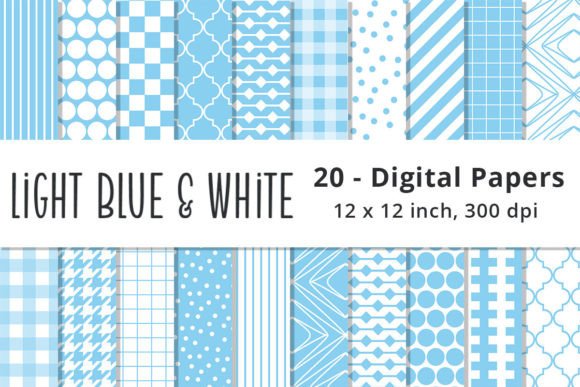
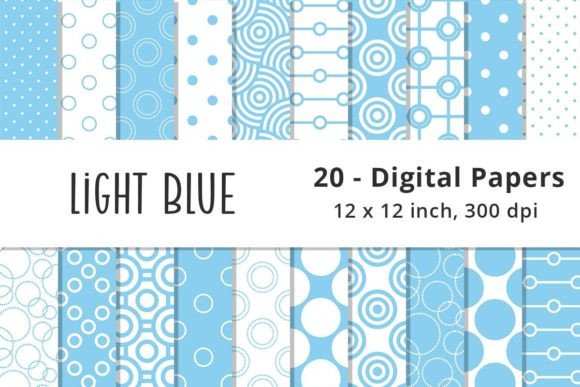
This guide explores the practical applications, technical considerations, and creative potential of the Light Blue and White Polka Dots Pattern Digital Paper Pack. By focusing on usability rather than just aesthetics, we aim to help creators maximize the value of these 20 high-quality seamless digital papers in their specific workflows.
The Enduring Appeal of Light Baby Blue Geometrics
Color psychology plays a significant role in surface pattern design. Light baby blue is universally recognized for its calming properties, making it the industry standard for infant-related products. However, the specific shade matters. The patterns discussed here utilize a soft, neutral light blue paired with crisp white. This combination ensures versatility; it avoids being overly saturated, which can cause printing issues, while remaining distinct enough to serve as a primary background or a supporting texture.
Geometric polka dot background patterns are particularly valuable because they are non-directional. Unlike floral or illustrative prints that have a distinct "up" and "down," polka dots allow for flexible placement. This characteristic is crucial when designing items like tumbler wraps or fabric yardage where orientation may shift during production. The seamless nature of these files means the pattern repeats infinitely without visible breaks, allowing designers to scale projects from small invitation cards to large wall murals without losing visual integrity.
Technical Specifications and File Management
Before incorporating any digital asset into a project, understanding the file format is critical to avoiding production errors. This collection consists of 20 JPG files with specific parameters:
- Dimensions: 12 x 12 inches (Standard scrapbook size)
- Resolution: 300 DPI (Dots Per Inch)
- Format: Flattened Raster JPG
- Style: Seamless Repeat
Note: These jpeg files are flattened raster files, not vector format. This distinction is vital for professionals. Raster images are pixel-based, meaning they have a fixed resolution. While 300 DPI at 12x12 inches is excellent for print, scaling the image up significantly beyond its original dimensions will result in pixelation. If your project requires massive enlargement, such as a billboard or vehicle wrap, you may need to use AI upscaling tools or seek vector alternatives. However, for standard consumer crafts, stationery, and apparel, this resolution is the gold standard for crisp, clear output.
Practical Applications Across Mediums
The true value of Printable Light Blue Polka Dot Patterns lies in their cross-platform compatibility. Below are detailed scenarios illustrating how different user groups can leverage this digital paper pack effectively.
Nursery Decor and Baby Shower Crafts
For parents and event planners, consistency is key to a polished look. Using the same digital pattern across various physical items creates a cohesive theme. Common applications include:
- Welcome Banners: Print multiple 12x12 sheets and trim them into pennants. The seamless edge allows you to align dots perfectly across separate pages when assembling the banner.
- Cupcake Toppers and Favor Bags: The light blue and white colorway provides high contrast for text overlays, ensuring names or dates remain legible.
- Nursery Wall Art: Frame printed patterns as affordable, customizable decor. Because the files are digital, you can reprint them if they become damaged or as the child’s room evolves.
- Memory Books: Use the patterns as consistent background pages for baby albums, providing a clean canvas for photos without overwhelming the subject matter.
Digital Planning and Journaling
In the realm of digital organization, visual hierarchy prevents cognitive overload. Light geometric backgrounds serve as excellent bases for digital planner pages and journal spreads. The uniformity of polka dots helps guide the eye without distracting from handwritten notes or typed content. Users of apps like GoodNotes, Notability, or Xodo can import these JPGs directly as page templates. The 12x12 aspect ratio may require cropping for tablet screens, but the high resolution ensures the dots remain sharp even on Retina displays.
Print-on-Demand (POD) and Commercial Design
For business owners and POD sellers, asset quality directly impacts customer satisfaction and return rates. When using these patterns for products like tumbler wraps, mugs, or fabric printing, color accuracy and seamlessness are paramount.
Best Practices for POD:
- Color Profiling: Always convert RGB JPGs to CMYK before sending to commercial printers to ensure the "light baby blue" prints as expected, rather than shifting toward purple or teal.
- Bleed Areas: Since these are 12x12 files, always account for bleed requirements. Do not place critical design elements near the edge unless the pattern itself is intended to be trimmed.
- Mockup Testing: Before listing products, print a test swatch. Screen brightness often deceives designers regarding how light pastel colors appear on physical substrates like ceramic or polyester.
Evaluating Suitability for Your Project
While Printable Light Blue Polka Dot Patterns are incredibly versatile, they are not a universal solution. Making an informed decision requires assessing your specific needs against the asset's characteristics.
Strengths
The primary strength of this pack is its specialization. It solves a specific problem: the need for gender-neutral yet traditional baby-themed textures. The inclusion of 20 variations prevents design fatigue, allowing creators to mix different dot sizes and spacing within the same project family while maintaining color consistency. Furthermore, the JPG format offers universal compatibility; virtually every editing software, printer, and cutting machine recognizes this file type without requiring specialized plugins.
Considerations and Limitations
Potential users must recognize the limitations of raster formats. As mentioned previously, infinite scalability is not possible. Additionally, because the files are flattened, individual dots cannot be moved, resized, or recolored independently. If you require the ability to change the blue to green or adjust the spacing dynamically, you would need a vector source file or advanced masking techniques in Photoshop.
Another consideration is color calibration. "Light Baby Blue" is subjective. Without a Pantone reference, the exact hue depends on your monitor settings and printer profile. Professionals should treat these files as a starting point and perform color corrections based on their specific output device.
Optimizing Workflow with Digital Papers
To get the most out of this Light Blue and White Polka Dots Pattern Digital Paper Pack, consider organizing your assets efficiently. Create a dedicated folder structure categorized by dot size or density. When working in layered software like Photoshop or Affinity Photo, use these patterns as clipping masks. This technique allows you to apply the polka dot texture only to specific shapes—such as letters, frames, or silhouettes—without permanently altering the original file.
For Cricut and Silhouette users, these 300 DPI JPGs are ideal for "Print Then Cut" projects. Ensure your machine’s calibration is current, as the sensor marks rely on high-contrast edges. The white space between light blue dots typically provides sufficient contrast for optical sensors, but testing on your specific paper stock is always recommended to prevent registration errors.
Making the Right Choice for Creative Success
Selecting the right digital background is about more than just liking a color; it is about matching technical capabilities with creative vision. Printable Light Blue Polka Dot Patterns offer a reliable, high-resolution foundation for a wide array of projects ranging from sentimental baby keepsakes to commercial merchandise. By understanding the raster nature of the files, respecting the 12x12 dimension constraints, and leveraging the seamless repeat functionality, creators can produce professional-grade work with confidence.
Whether you are filling a digital planner with calming geometry or printing custom fabric for a nursery quilt, these patterns provide the aesthetic consistency necessary for polished design. Remember to always verify licensing terms for commercial use and conduct physical print tests when color precision is required. With proper handling, this digital paper pack serves as an enduring resource in any crafter or designer’s library, proving that sometimes the simplest geometric forms offer the most profound creative utility.