Spring Petals - Teal and Yellow: A Guide to Using Digital Papers Effectively
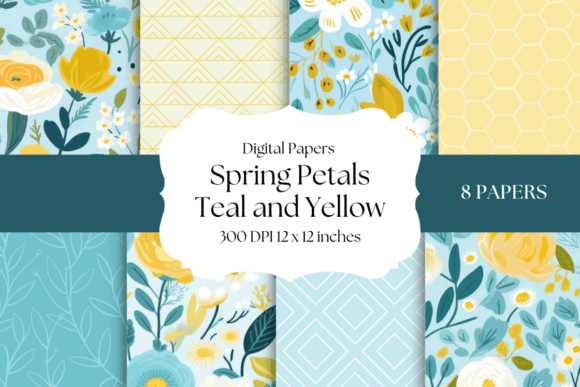
Introducing “Spring Petals” brings a captivating collection of digital papers designed to infuse creative projects with the refreshing energy of the season. This set features eight stunning 12”x12” backgrounds presented in high-quality 300 dpi JPEG format, showcasing a harmonious blend of yellow, teal, and green florals. For digital artists, scrapbook enthusiasts, and designers, these nature-inspired patterns offer a versatile foundation for artistic expression. However, acquiring high-quality assets is only the first step; understanding how to properly evaluate, manage, and apply these files ensures your final creations maintain their professional integrity and visual impact.
Evaluating Resolution and Color Accuracy Before You Begin
A common oversight when selecting digital backgrounds like Spring Petals - Teal and Yellow is assuming that all downloadable files are universally suitable for every medium. While this collection is provided at 300 dpi (dots per inch), which is the industry standard for crisp printing, users sometimes mistakenly attempt to upscale lower-resolution previews or web-optimized samples found on social media. Using an image below 300 dpi for physical prints results in pixelation and blurriness, particularly in the intricate petal details that define this collection. Always verify the file properties after downloading to confirm the dimensions are truly 3600x3600 pixels before incorporating them into print layouts.
Color management is another critical detail often overlooked by hobbyists and professionals alike. The vibrant teal and yellow hues in Spring Petals are calibrated for digital displays, but monitors emit light while paper reflects it. Without proper color profiling, printed results may appear duller or shifted compared to what you see on screen. To avoid disappointment in card making or scrapbooking, perform a test print on your intended paper stock. If you are designing for commercial print products, ensure your software is set to the correct CMYK profile recommended by your printer, as RGB colors in these JPEGs may need conversion to maintain that signature springtime freshness in physical form.
Strategic Application in Scrapbooking and Memory Keeping
When using Spring Petals for scrapbooking, beginners frequently make the mistake of allowing busy floral patterns to compete with photographs rather than complement them. These papers feature rich textures and saturated colors that can easily overwhelm vintage photos or portraits with soft lighting. Instead of using a full-sheet pattern as the primary background for every page, consider more balanced approaches:
- Use as Accent Elements: Cut the paper into strips, circles, or custom shapes to frame photos without obscuring the focal point.
- Adjust Opacity: In digital layout software, lower the opacity of the background layer or add a solid white overlay to soften the pattern intensity.
- Create Visual Hierarchy: Pair the bold teal and yellow designs with solid coordinating cardstock or neutral journaling cards to give the eye a place to rest.
This thoughtful application preserves the elegance of the collection while ensuring your memories remain the star of the layout. Remember that negative space is just as important as patterned content in effective memory keeping.
Avoiding Composition Pitfalls in Digital Art and Mixed Media
Digital artists exploring mixed-media collages often underestimate the importance of blending modes when working with high-contrast floral papers. Simply placing Spring Petals - Teal and Yellow as a top layer can result in a flat, pasted-on appearance that lacks depth. Experienced creators know that integrating these textures requires experimentation with layer styles. Try using "Multiply" to darken underlying elements through the paper texture, or "Screen" to lift highlights and create an ethereal glow. These techniques transform a static background into an active component of the artwork.
Another efficiency trap involves file organization. With eight distinct designs in the set, failing to rename or tag files upon download leads to workflow friction later. Rather than keeping generic filenames, take a moment to categorize them by dominant color or pattern density immediately. This small administrative step saves significant time when you are searching for the perfect yellow accent or subtle green texture during an active creative session. Proper asset management is a hallmark of professional practice that directly impacts project turnaround and creative flow.
Maximizing Value in Printable Projects and Card Making
For those utilizing Spring Petals in DIY crafts like envelope liners, gift tags, or greeting cards, material waste is a practical concern. A frequent error is printing full 12”x12” sheets for small items without planning. This approach quickly becomes costly and environmentally taxing. Before hitting print, use layout software to nest multiple tags, liners, or card fronts onto a single sheet. Many design programs allow you to arrange cut lines efficiently, maximizing the usable area of each digital paper.
Additionally, consider the weight and finish of your chosen paper stock relative to the design. The lush botanical details in this collection shine best on matte or satin finishes that absorb ink evenly. High-gloss papers can sometimes cause the vibrant yellows to reflect excessively, making text difficult to read and altering the perceived color balance. Matching the physical substrate to the digital aesthetic ensures that invitations and announcements convey the intended tone of nature-inspired elegance. Testing different paper types with a single sheet of Spring Petals can prevent costly reprints for large batches of stationery.
Making Informed Decisions for Creative Success
Before purchasing or downloading any digital paper collection, assess whether the style aligns with your current and future project needs. Spring Petals - Teal and Yellow offers specific seasonal versatility, but its distinct color palette works best when coordinated with complementary assets. Check if you already own matching solids, alphabets, or embellishments that share similar undertones. Investing in a cohesive ecosystem of design elements prevents the frustration of having beautiful backgrounds that clash with existing supplies.
Finally, understand the licensing terms associated with digital downloads. Clarify whether the files are permitted for personal use only or if they extend to small business commercial applications. Misunderstanding usage rights can lead to legal complications or ethical dilemmas for entrepreneurs selling handmade goods. By verifying permissions upfront, you protect your business and respect the creator’s work. When approached with technical awareness and strategic planning, this collection serves as more than just decoration; it becomes a reliable tool for elevating your creative output with confidence and quality.