Abstract Watercolor American Flags: Elevating Patriotic Design with Artistic Texture
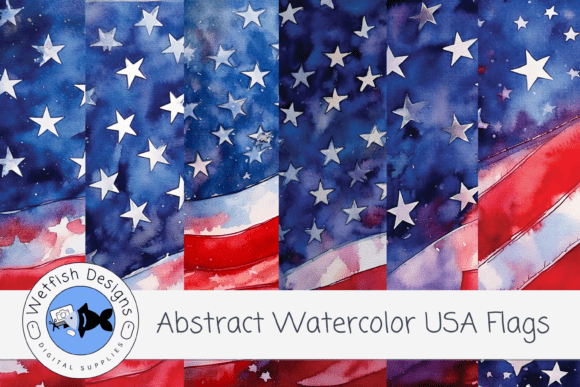
Celebrating American pride doesn't always require rigid geometry and flat, solid colors. For creators seeking a more nuanced expression of patriotism, Abstract Watercolor American Flags offer a compelling alternative to traditional vector graphics. This specific digital paper pack provides six high-resolution backgrounds that merge national symbolism with expressive artistry. By combining distressed brush strokes, splattered effects, and subtle ink textures, these designs move beyond standard clip art into the realm of mixed media aesthetics. The result is a bold, weathered look that feels authentic and lived-in rather than manufactured.
However, integrating artistic flag imagery into professional or personal projects requires more than simply dragging and dropping a file. Many designers and hobbyists overlook critical technical and aesthetic details when working with textured digital papers. Understanding how to properly evaluate, apply, and optimize these assets ensures your July 4th crafts, scrapbook pages, or sublimation designs achieve the intended emotional impact without sacrificing print quality or visual clarity.
Misunderstanding Resolution and Print Viability
A frequent mistake when sourcing patriotic digital assets is assuming all "high resolution" files are created equal. In the context of Abstract Watercolor American Flags, resolution dictates whether the delicate watercolor bleeds and ink splatters remain crisp or turn into pixelated mud. This pack delivers files at 300 DPI with dimensions of 3600 x 3600 pixels (12 x 12 inches). This specification is the industry standard for high-quality printing, yet many users still attempt to stretch smaller web-optimized images to fit this size, resulting in degradation.
Conversely, some creators mistakenly believe they must downscale these large files for digital use, losing valuable texture data in the process. When designing for platforms like Canva or Procreate, maintain the original resolution as long as possible. Downscaling should only happen at the final export stage. If you are creating printable wall art or greeting cards, verify that your canvas size matches the 12x12 aspect ratio or plan your cropping strategy before placing the image. Cropping a watercolor texture too aggressively can remove the intentional negative space or distress marks that give the design its character.
Checking Color Profiles Before Production
Watercolor art relies heavily on color blending and saturation. A common oversight is neglecting color profile management between screen and print. Digital papers are typically displayed in RGB on monitors, but home printers and commercial sublimation services often interpret colors differently. The bold red, white, and blue hues in this pack are designed to be vibrant, but without proper calibration or soft-proofing, printed results may appear duller or shifted toward magenta.
To avoid disappointment, test print a small section of the paper on your intended substrate before committing to a full project. For sublimation on T-shirts or stickers, remember that polyester fabrics absorb ink differently than paper. The "weathered" aesthetic of these abstract flags actually works in your favor here; the organic variations in the watercolor texture help mask minor banding or color shifts that might be glaringly obvious in a solid, flat-color flag design.
Overlooking Composition and Negative Space
Artistic flag designs are inherently busy. The layered textures, grunge elements, and expressive brushwork create visual complexity. A significant error beginners make is treating these backgrounds as mere filler rather than active design elements. Placing detailed text directly over a dense cluster of red and blue splatters renders the content illegible and creates visual chaos.
Effective use of Abstract Watercolor American Flags requires respecting negative space. When selecting from the six included papers, analyze the distribution of texture. Some files may feature heavier distressing in the center, while others push elements to the edges. Match the paper’s composition to your project’s hierarchy:
- For Greeting Cards: Choose papers with softer, lighter centers to ensure handwritten messages or stamped sentiments remain readable.
- For Scrapbooking: Select designs with balanced texture distribution that won’t compete with photographs. You may need to use opacity masks or blend modes to tone down areas behind photos.
- For Wall Art: Opt for bolder, high-contrast versions where the flag itself is the focal point, requiring minimal additional typography.
If you find a texture perfect in color but too intense for your layout, utilize layer masking in Photoshop or Procreate rather than discarding the file. Reducing opacity or applying a Gaussian blur to specific zones preserves the artistic integrity while improving functionality.
Evaluating Style Consistency Across Projects
When working with a themed pack, inconsistency can undermine professionalism. Each of the six papers in this set offers a unique variation, but they share a cohesive DNA of distressed elegance. A misstep occurs when mixing these organic, hand-painted textures with sharp, corporate vector icons or neon gradients. The clash in style communicates mixed messages—is this a vintage heritage piece or a modern tech ad?
Before purchasing or downloading, assess whether the "grungy watercolor" aesthetic aligns with your brand voice or project theme. These papers excel in contexts valuing authenticity, history, and creativity. They are less suitable for minimalist corporate reports or sleek futuristic designs. If your goal is a clean, flat-design aesthetic, forcing an abstract watercolor texture will feel out of place. However, for educators creating engaging history materials, bloggers covering Independence Day traditions, or small businesses selling artisanal patriotic goods, this textured approach adds necessary warmth and depth.
Technical Considerations for Digital Integration
Users of design software like Canva, Procreate, or Photoshop should understand file handling specifics. Since these are JPG files, they do not support transparency natively. A common frustration arises when trying to isolate just the flag element from the background. Unlike PNGs, JPGs include the entire 12x12 canvas.
To integrate these effectively:
- Use Blend Modes: Instead of erasing backgrounds, experiment with Multiply, Screen, or Overlay blend modes to merge the watercolor texture with colored backgrounds seamlessly.
- Clipping Masks: In Procreate or Photoshop, clip the flag paper into a shape layer (like a star or banner) to contain the texture without destructive editing.
- Instant Download Management: As this is an instant digital download, organize files immediately upon receipt. Rename them descriptively (e.g., "Flag_Watercolor_Distressed_RedBlue_01.jpg") rather than keeping generic filenames. This prevents workflow interruptions later when searching through hundreds of assets.
Failing to organize or understand format limitations leads to wasted time and inefficient workflows. Recognizing that JPGs are raster-based also means understanding they cannot be infinitely scaled up like vectors. While 3600x3600 pixels is generous, attempting to print a billboard-sized banner from this file will result in visible artifacts. Respect the medium’s boundaries to maintain quality.
Making Informed Creative Decisions
Ultimately, choosing Abstract Watercolor American Flags is a decision to prioritize emotion over precision. The value lies in the imperfections—the ink bleeds, the uneven edges, and the layered hues that evoke nostalgia and artistic freedom. By avoiding common pitfalls regarding resolution, color management, composition, and software compatibility, you ensure these beautiful textures serve their purpose effectively.
Whether you are crafting a memorable July 4th invitation, designing sublimation apparel, or building a mixed media collage, take a moment to evaluate the asset against your specific needs. Check the DPI, test the colors, plan your text placement, and respect the artistic style. When used thoughtfully, this digital paper pack transforms standard patriotic projects into expressive works of art where freedom truly meets creativity.