Elevating Creative Projects with Watercolor Pink Digital Paper Backgrounds
In the ever-evolving world of digital design and crafting, texture plays a pivotal role in transforming a flat concept into an emotionally resonant piece of art. Among the myriad of aesthetic choices available to modern creators, watercolor pink backgrounds have emerged as a timeless favorite. These digital assets bridge the gap between traditional artistic techniques and contemporary digital workflows, offering a softness and organic quality that solid colors simply cannot replicate. Whether you are a professional graphic designer, a scrapbooking enthusiast, or a small business owner creating product packaging, understanding how to effectively utilize high-quality watercolor digital papers can significantly elevate the perceived value of your work.
The Enduring Appeal of Pink Watercolor Textures
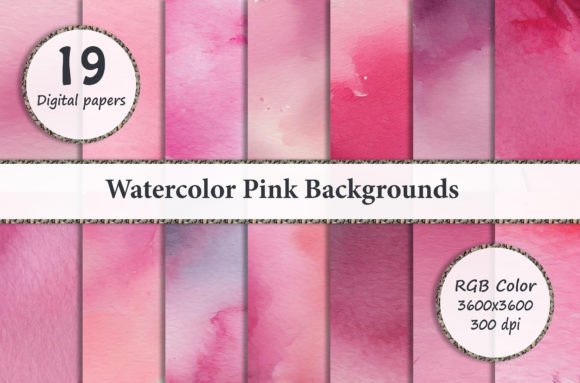
Pink is often associated with romance, tenderness, and playfulness, but when rendered in watercolor, it transcends simple color psychology. The medium of watercolor introduces unpredictability, fluidity, and depth. When digitized at high resolutions, these textures retain the delicate bleeding of pigments and the subtle grain of paper, providing a tactile experience through a screen. This specific collection of 19 Watercolor Pink Digital Paper Backgrounds is designed to capture that authentic artistic feel. Unlike synthetic gradients generated by software, genuine watercolor scans carry the imperfections and nuances of hand-painted art, making them perfect for designs that require a human touch.
The versatility of this color palette allows it to fit seamlessly into various niches. For baby showers and gender reveal parties, the soft hues provide a gentle backdrop. For fashion and beauty branding, the same textures can convey luxury and femininity. In educational materials, lighter pinks can be stimulating without being distracting. Understanding this duality is key to maximizing the utility of digital paper packs in both personal and commercial projects.
Technical Specifications and Software Compatibility
Before diving into creative applications, it is essential to understand the technical foundation of these assets to ensure they integrate smoothly into your workflow. This set includes JPEG files sized at 3600 x 3600 pixels with a resolution of 300 DPI. These specifications are not arbitrary; they are the industry standard for high-quality printing. A 3600-pixel square translates to a 12-inch by 12-inch print area at full quality, which covers everything from standard scrapbook pages to large-format wall art.
Essential Tools for Digital Papers
To fully leverage these backgrounds, users should possess basic knowledge of layer-based editing software. The primary platforms compatible with these files include:
- Adobe Photoshop: The industry standard for raster graphics, offering advanced blending modes and masking capabilities ideal for integrating watercolor textures.
- Photoshop Elements: A more accessible version of Photoshop that retains core layer functionality, perfect for hobbyists and crafters.
- Paint Shop Pro: A robust alternative that supports high-resolution JPEGs and layer management efficiently.
Note to Lightroom Users: It is crucial to understand that Adobe Lightroom is primarily a photo development tool and does not natively support layers in the same way Photoshop does. To use these digital papers within a Lightroom workflow, please ensure you have a plugin installed that specifically allows for layer-based compositing. Without this addition, you will be limited to basic overlays rather than true integration.
Practical Applications Across Creative Disciplines
The true value of a digital paper pack lies in its adaptability. Because these files are high-resolution squares, they serve as foundational elements for a vast array of physical and digital products. Below are detailed explorations of how these watercolor pink backgrounds function in real-world scenarios.
Stationery and Invitation Design
Invitations set the tone for any event. Using a watercolor pink background for wedding invites, birthday cards, or greeting cards immediately communicates warmth and elegance. The texture prevents the design from looking sterile, allowing typography to float atop a bed of organic color. For printing labels and tags, the 300 DPI resolution ensures that even small text remains crisp against the painted backdrop.
Digital Scrapbooking and Memory Keeping
Scrapbooking has transitioned from glue sticks to pixels, but the desire for texture remains. These digital papers act as the virtual cardstock for digital albums. Creators can clip photos to the watercolor shapes, use the textured areas as journaling spots, or blend multiple papers together to create complex, multi-layered layouts. The 3600 x 3600px size is specifically optimized for standard digital scrapbooking templates, ensuring no loss of quality when resizing.
Merchandise and Product Design
For entrepreneurs and makers, these backgrounds are a cost-effective way to prototype and produce merchandise. The seamless nature of the watercolor wash makes it suitable for:
- T-Shirts and Apparel: Sublimation printing on fabric requires high-DPI files to prevent pixelation. The pink watercolor aesthetic is particularly popular in boutique clothing lines.
- Cell Phone Covers: Custom phone cases rely heavily on pattern and texture. These backgrounds provide enough visual interest to stand alone or serve as a base for monograms.
- Nail Wraps: The intricate details of watercolor translate beautifully to the small canvas of nail art, where solid colors often look flat.
- Bottle Caps and Magnets: These small-format items benefit from the central focal points often found in watercolor compositions.
Web and Interface Design
In website design, user experience is paramount. While busy patterns can distract from content, soft watercolor backgrounds add personality without compromising readability. They are excellent for hero sections, sidebar backgrounds, or footer accents. The organic flow of the paint guides the eye naturally across the page, creating a more immersive browsing experience compared to stark white or solid hex-code backgrounds.
Best Practices for Working with Layers
Having access to high-quality files is only half the battle; knowing how to manipulate them is what separates amateurs from professionals. Since these are JPEG files, they do not come with pre-separated layers. Therefore, mastering layer techniques in Photoshop or similar software is mandatory.
Blending Modes: Experiment with "Multiply," "Screen," and "Overlay" modes to merge the watercolor paper with other elements. Multiply is excellent for darkening the texture to make white text pop, while Screen can lighten the background for a dreamy, ethereal effect.
Masking vs. Erasing: Never use the eraser tool on your original digital paper layer. Instead, use layer masks to hide portions of the watercolor non-destructively. This allows you to bring back texture if you change your mind later in the design process.
Adjustment Layers: Even though the papers are pink, you may need to tweak the hue or saturation to match a specific brand guideline. Use Hue/Saturation or Color Balance adjustment layers clipped to the paper layer to customize the shade without altering the original file.
Common Misunderstandings About Digital Papers
New designers often assume that digital papers are merely "clipart" or low-resolution web images. It is vital to clarify that this set consists of print-ready assets. Another common misconception is that JPEGs are inferior to PNGs for backgrounds. While PNGs support transparency, high-quality JPEGs are often superior for full-canvas textures because they handle color gradients more efficiently at smaller file sizes, making them easier to store and transfer without sacrificing the 300 DPI fidelity required for professional output.
Additionally, some users believe that using digital paper limits creativity to the pre-made design. On the contrary, these backgrounds are starting points. Through cropping, rotating, color grading, and combining multiple sheets from the 19-paper zip file, a designer can generate thousands of unique variations, ensuring that no two projects look exactly alike.
Conclusion: Investing in Quality Assets
Incorporating Watercolor Pink Digital Paper Backgrounds into your creative arsenal is an investment in versatility and quality. Whether you are designing a desktop wallpaper, crafting a memorable birthday party decoration, or building a cohesive brand identity, the technical reliability of 3600 x 3600px, 300 DPI files ensures your vision translates perfectly from screen to reality. By mastering the necessary software skills and understanding the broad scope of applications—from nail wraps to website headers—you unlock the full potential of these beautiful, emotive textures. Embrace the fluidity of digital watercolor and let it bring a fresh, organic vitality to your next creative endeavor.